LLMs for Flocking — A Contribution Guide
January 23, 2024
Note: This project's GitHub repository can be located here here.
Hello! This a guide on how to contribute to the codebase of the LLMs for Flocking paper. If you're reading this, it means you are a contributor — welcome! For clarity's sake, I'll be dividing this guide into 3 sections: the issues board, git 101, and pull requests. Feel free to skip to any particular section and read that first.
The Issues Board
The issues board is where we can keep track of what needs work, and who's responsible for it. It lets us add any actionable tasks can think of to the board, assign tasks we wish to complete to ourselves, and mark them as done once we're finished!
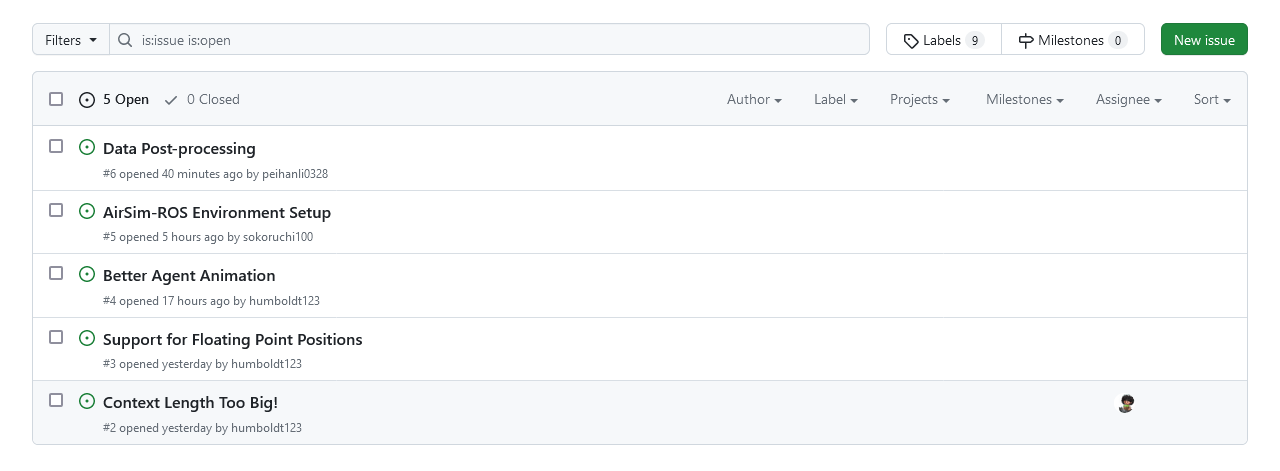 Our GitHub issues board
Git 101
Note: Make sure to put your GitHub username in the Teams chat so you can be added to the repositoryWhile working on this project, we will be using git, more specifically GitHub. If you haven't already, download git and create a GitHub account. This guide assumes you know how to use the command line. If you are unfamiliar with git, I've found this guide really helpful to learn some of the most common commands. Or, feel free to reach out to me for help!
Your first step should be to find a suitable directory to work in, and thengit clone the repository with:
git clone https://github.com/Zhourobotics/llms-for-flockingllms-for-flocking directory in your IDE of choice and create a new branch:
git checkout -b YOURBRANCHNAMEgit push origin YOURBRANCHNAMESemantic Commit Messages
When naming your commits, it's important to follow the standard[1] we use for commit names.
Format: <type>: <subject>
feat: add animated graphview
^--^  ^------------^
|     |
|     +-> Summary in present tense.
|
+-------> Type: chore, docs, feat, fix, refactor, style, or test.feat: (new feature for the user, not a new feature for build script)fix: (bug fix for the user, not a fix to a build script)docs: (changes to the documentation)style: (formatting, missing semi-colons, etc; no production code change)refactor: (refactoring production code, eg. renaming a variable)test: (adding missing tests, refactoring tests; no production code change)chore: (updating grunt tasks etc; no production code change)
Pull Requests
Because we're all working collaboratively through git and want to avoid merge conflicts, we shouldn't directly push code to main Rather, we can use pull requests. When requesting a pull from the branch you've been working on, write a good description of what code does. (And if you're feeling fancy, maybe include a video demo.) Then, mention the issue number of the issue it fixes. (like this: #ISSUE_NUMBER). Finally, request a review. After someone else has reviewed your code, it can be merged into main and you can delete your branch.
Congratulations 🎉